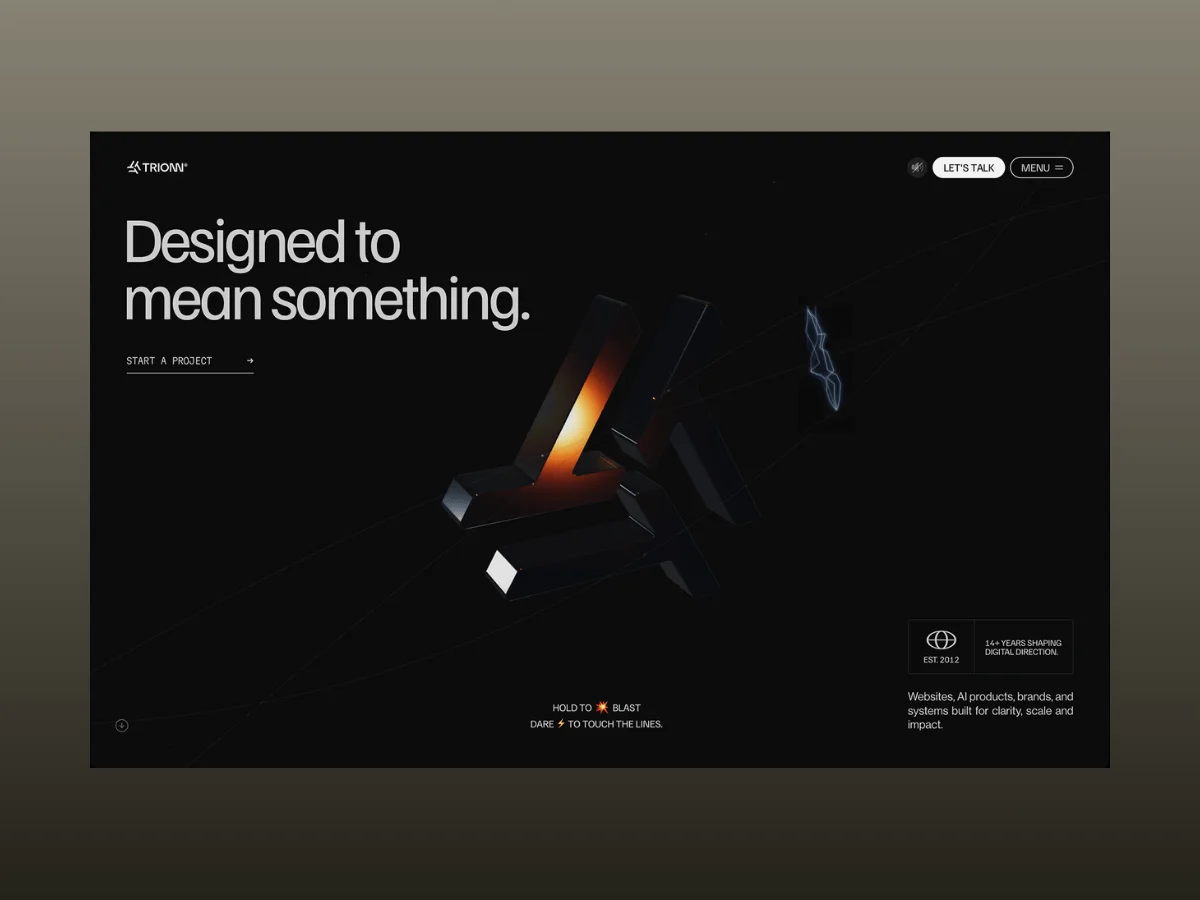
The creation of Trionn wasn't just a design quest; it was an ambitious experiment focused on merging animation, WebGL, and interactive elements into one cohesive web presence. After comprehensive iterations that spanned several months, the project materialized into a sophisticated interplay of technologies including GSAP, Three.js, Lenis, and customized Web Audio features, all tailored to deliver a responsive digital experience where each section functions as part of an integrated ecosystem.
What’s striking is how the project transitioned from several initial concepts. Elements like an interactive hero, scroll-driven narrative techniques, and dynamic real-time graphics didn't spring forth fully formed; they gradually merged into a unified framework for animation, showcasing an evolutionary design process.
Developed over a four-month period, Trionn has received accolades from prestigious platforms such as FWA, GSAP, Orpetron, CSS Design Awards, Web Design Awards, and CSS Winner. Yet, beyond the accolades, the creative process unearthed significant technical hurdles related to performance optimization, synchronization challenges, rendering issues, and interaction design intricacies.
In this case study, we’ll dissect the foundation of Trionn, focusing on the underlying architecture, the animation systems utilized, the WebGL techniques employed, and the strategies adopted to optimize performance.
Technical Insights
Creating a site with such intricate animations requires a delicate balance between creativity and technical performance. Each technology in this stack serves a distinctive role—driving animations, managing scroll interactions, rendering captivating WebGL scenes, and generating real-time audio.
Key technologies integrated into the project include:
- GSAP + @gsap/react for managing timelines, user interactions, and fine-tuned page transitions.
- ScrollTrigger for implementing scroll-related interactions, like pinned sections and reveal sequences.
- SplitText for creating customizable text animations at various granular levels.
- Three.js as the backbone for the hero graphics, featured sections, and the interactive portfolio grid.
- Lenis for enhancing smooth scroll effects, in sync with GSAP.
- Web Audio API for real-time sound generation and audio interactions.
- Next.js and React for application structuring and framework support.
- Tailwind CSS for design aesthetics.
- Swiper for dynamic testimonial and award showcases.
At the heart of this vibrant animation ecosystem lies GSAP, orchestrating a myriad of animations—from page transitions to scroll-triggered sequences and component-specific animations—all meticulously managed through GSAP timelines and the <a href="https://gsap.com/resources/React/">useGSAP</a> hook, streamlining component management throughout Next.js.
ScrollTrigger plays a pivotal role in directing the majority of scroll interactions across the site. This includes everything from pinned narrative sections to scrubbed animations that conjoin user actions with visual drama. Additionally, gsap.matchMedia() is heavily leveraged, permitting distinct animation logics for desktop and mobile experiences, avoiding a one-size-fits-all approach.
For animating text, we developed an adaptable BlurTextReveal component using SplitText, which supports character, word, and line-based animations. It streamlines functionality, handling reduced motion settings and GPU layer management efficiently.
Three.js facilitates the site’s unique WebGL elements, diverging from using React Three Fiber to maintain precision over the render loop and resource handling, especially for the intricately animated hero symbol.
Lenis coordinates with gsap.ticker to synchronize scrolling mechanisms site-wide, ensuring a cohesive user experience.
To amplify interactivity, sound effects—such as those for the hero's hover, explosion, and welding effects—are generated using the Web Audio API, enabling a dynamic audio landscape rather than relying on static sound files.
Hero Section Dynamics
The development of the hero section was especially dynamic, integrating a range of technologies—WebGL, GSAP, SplitText, and the Web Audio API—into a singular interactive scheme, making it one of the most complex components of the site.
The hero is constructed from two interconnected layers: a Three.js scene that forms the backdrop, rendering the brand symbol and its various interactions—such as idle motion, hover effects, and explosive interactions—and a foreground of standard DOM elements, including the headline and rotating words, which are animated using GSAP and SplitText. This combination allows the text to remain accessible while effectively blending with the animated canvas.
Both layers operate under a synchronized transitionReady mechanism, which triggers animations only after a page transition is completed, using requestIdleCallback to manage performance efficiently and keep the initial loading snappy.
The Hero Headline Animation
The introduction of the hero headline—“Designed to”—is executed through a staggered animation style, where each character appears one at a time, emphasizing a more engaging viewer experience compared to conventional fade-ins.
// components/Sections/Home/Banner.tsx — usage
<BlurTextReveal
 as="h1"
 text="Designed to"
 animationType="chars"
 stagger={0.08}
 delay={1.2}
/>

// components/TextAnimation/BlurTextReveal.tsx — the underlying engine
const split = new SplitText(textRef.current, {
 type: "chars, words, lines",
 smartWrap: true,
});

const targets = split.chars;

gsap.set([textRef.current, targets], {
 autoAlpha: 0,
 filter: "blur(12px)",
 willChange: "filter, opacity",
});

const tl = gsap.timeline({
 paused: manual,
});

tl.to(textRef.current, {
    autoAlpha: 1,
    filter: "blur(0px)",
    duration: 0.5,
  }, delay)
  .to(targets, {
    autoAlpha: 1,
    filter: "blur(0px)",
    duration: 0.8,
    stagger: {
      each: 0.08,
      from: "random",
    },
    ease: "power2.out",
  }, delay);
By using filter: blur() along with opacity modulation, the text appears to come alive instead of merely fading in. After the animation concludes, we eliminate will-change, freeing up GPU layers for other elements.
This same BlurTextReveal component is employed across the site for various textual elements, each time tailored to fit specific animation requirements.
Idle Behavior of the Hero Symbol
In its rest state, the hero symbol exhibits a gentle rotation while its three arms undulate in a sine-wave pattern with offset phases, creating a fluid and organic visual rhythm.
// hooks/useTrionnSymbolScene.ts — ongoing update loop

// Automatic rotation adjusts to mouse position
if (!st.dragging) {
  st.rotY += prefersReducedMotion ? 0.0015 : 0.0042;
  st.rotX = Math.max(-Math.PI / 2, Math.min(Math.PI / 2, st.rotX));

  group.rotation.x +=
    (st.rotX + mouse.y * 0.22 - group.rotation.x) * 0.06;
  group.rotation.y +=
    (st.rotY + mouse.x * 0.22 - group.rotation.y) * 0.06;
}

// Each arm has independent movement for enhanced realism
particles.forEach((p) => {
  const phase = p.shapeIdx * (Math.PI * 2 / 3);

  const armDriftX =
    Math.sin(t * 0.4 + phase) * 0.012 * (1 - explodeAmt);
  const armDriftY =
    Math.cos(t * 0.35 + phase) * 0.008 * (1 - explodeAmt);
  const armDriftZ =
    Math.sin(t * 0.3 + phase * 1.5) * 0.006 * (1 - explodeAmt);
});
When the reduced motion preference is active, we simply adjust the speed instead of disabling motion entirely. Mouse movement is smoothed using linear interpolation, giving the symbol a magnetic, organic feel as it reacts to user input. The ambient drift also scales back as other interaction states become active.
Magnetic Hover Effects
Upon hovering over the symbol with the cursor, the corresponding panel “charges,” visibly brightening and reflecting light, accompanied by a distinct beep for the first interaction. This hover detection is accomplished via raycasting, allowing the interaction to map precisely to the symbol’s geometry as it moves.
// hooks/useTrionnSymbolScene.ts — raycasting for hover detection

const raycaster = new THREE.Raycaster();

if (
  st.mouseScreenX !== -9999 &&
  st.scrollProgress < 0.08 &&
  st.clickBurst < 0.05 &&
  st.introAmt < 0.08
) {
  raycaster.setFromCamera(mouse, camera);

  const hits = raycaster.intersectObjects(
    particles
      .filter((p) => !p.isEdge)
      .map((p) => p.mesh as THREE.Mesh),
    false,
  );

  const nowHit = hits.length > 0 ? hits[0].object : null;

  if (nowHit !== st.hoveredMesh) {
    if (nowHit) {
      const hm = nowHit as THREE.Mesh & {
        _flash?: number;
        _flashActive?: boolean;
      };

      hm._flash = 1.0; // triggers visual feedback
      hm._flashActive = true;

      audio.playHoverBeep(); // sound triggers only for new panel interaction
    }

    st.hoveredMesh = nowHit;
  }
}

// Decay the highlight effect
mesh._flash = (mesh._flash || 0) * 0.92;

const f = mesh._flash;

mat.envMapIntensity = 3.0 + f * 1.6;
mat.clearcoatRoughness = Math.max(0.01, 0.05 - f * 0.035);
mat.transmission = 0.35 + f * 0.32;
});
Raycasting ensures that the hover effects are closely aligned with the symbol’s actual form and movement. Each panel’s highlight decays autonomously, avoiding the complexity and performance costs of multiple GSAP tweens.
Weld Spark Visuals
As the page loads, three guiding lines extend from the symbol. Once this animation wraps up, hovering over any of these lines triggers a lively burst of spark animations, visually emphasizing the invitation to “Dare ⚡ to touch the lines.”
// hooks/useTrionnSymbolScene.ts

const baseLinesReadyForSpark =
  inS1 &&
  undrawAmt < 0.02 &&
  st.lineState.every((s) => s.prog >= 0.995);

if (baseLinesReadyForSpark) {
  const allLinePts = [ptsL, ptsR, ptsB];

  let hitResult: { x: number; y: number } | null = null;
  let hitLineIdx = -1;

  for (let li = 0; li < allLinePts.length; li++) {
    const h = mouseNearLine(allLinePts[li], 14);

    if (h) {
      hitResult = h;
      hitLineIdx = li;
      break;
    }
  }

  if (hitResult !== null) {
    // Trigger sparks on hover
    if (!st.sparkHoverActive && st.sparkWasAway) {
      st.sparkHoverActive = true;
      st.sparkBurstLeft = 5 + Math.floor(Math.random() * 2);
      st.sparkWasAway = false;
    }

    if (st.weldCooldown <= 0 && st.sparkBurstLeft > 0) {
      const wp = unproj2(hitResult.x, hitResult.y);

      const otherIdxs = [0, 1, 2].filter((i) => i !== hitLineIdx);
      const count = Math.random() > 0.5 ? 1 : 2;

      const targetIdxs = otherIdxs
        .sort(() => Math.random() - 0.5)
        .slice(0, count);

      const nearWpts = targetIdxs.map((li) => {
        const pts = allLinePts[li];

        let bestPt: LinePt | null = null;
        let bestD = Infinity;

        for (const pt of pts) {
          const dd =
            (pt.x - hitResult!.x) ** 2 +
            (pt.y - hitResult!.y) ** 2;

          if (dd < bestD) {
            bestD = dd;
            bestPt = pt;
          }
        }

        return unproj2(bestPt!.x, bestPt!.y);
      });

      triggerWeld(wp, nearWpts, !st.sparkSoundPlayed);

      st.sparkBurstLeft--;
      st.weldCooldown = 0.04 + Math.random() * 0.06;
    }
  }
}
This spark generation routine is activated only once all guiding lines are fully drawn, with checks ensuring that new bursts occur only on fresh hovers, rather than on continuous contact. Each spark burst is unique, involving randomized numbers of visual and auditory elements, ensuring that user interactions remain engaging and never repeat exactly.
The “weld” effect is lean, rendered with THREE.Line geometries to achieve the desired aesthetic without incurring the costs associated with post-processing effects. This artistic touch is complimented by an offscreen 2D <canvas>, which serves as a texture in the Three.js environment, optimizing performance while enhancing visual fidelity.
Hold-to-Blast Interaction
When the hero symbol is clicked and held, it initiates a multi-faceted interaction: surrounding interface components begin to vibrate, signaling a build-up of energy. After approximately half a second, the symbol disassembles into its individual panels, each dispersing along distinct trajectories while an explosion visual and sound amplify the event. Releasing the click reverses this energetic display, gracefully reassembling the symbol back to its original form.
Engaging the Charge-Up
On pressing the symbol, the interaction enters its charging phase, resetting timers and activating vibration feedback prior to the resulting blast sequence.
const onMouseDown = (e: MouseEvent) => {
  // ... hit-test logic omitted ...

  st.holding = true;
  st.holdTime = 0;
  st.vibrateAmt = 1.0;
  st.vibratePhase = 0;
  st.clickBurst = 0;
  st.joinPlayed = false;
};

window.addEventListener("mousedown", onMouseDown);